
In 2026, AI music has evolved beyond simple generation. For producers, the real value of a Suno track lies in its stems—the isolated vocal, drum, bass, and instrumental tracks. Whether you are creating an AI cover, sampling a unique synth hook for your DAW, or polishing a track for Spotify, having clean stems is the difference between a "hobbyist" sound and a professional production.
However, extracting these files without the dreaded "AI chirps" or robotic artifacts is a technical challenge. In this guide, we break down the latest 2026 workflows to help you download and refine Suno AI stems for any creative project.
Why You Need Stems for Your Suno Tracks
Downloading a flat MP3 is fine for listening, but the SunoDown community is increasingly focused on secondary creation. Stems are essential for:
- Vocal Replacement (AI Covers): Isolating the vocal track to replace it with a custom RVC voice model or your own recorded vocals.
- Professional Mixing: Importing drums, bass, and melodies into Logic Pro or Ableton Live to add human-led compression, EQ, and spatial effects.
- Sampling: Extracting a specific 4-bar loop to use as a foundational layer for a completely new genre.
- Remixing: Stripping a song down to its acapella to build an entirely different rhythmic structure beneath it.
Method 1: Using Suno’s Built-in "Get Stems" Feature (2026 Update)
As of early 2026, Suno has updated its Studio Mode with enhanced stem extraction. Users can now choose to "Get Stems" directly from the song menu.
The 2026 Specs:
- Resolution: Studio Mode now outputs stems in 32-bit/48kHz WAV format, providing more headroom for mastering compared to the standard 16-bit exports of 2025.
- The Limitation: While convenient, official Suno stems often suffer from "Spectral Bleed." For example, you might still hear faint drum snares in your vocal track, or the bass might sound "wobbly" due to the way the model renders audio holistically rather than as discrete tracks.
Method 2: High-Fidelity Extraction via Professional AI Tools
For professional producers, the official Suno stems are often just the starting point. If the native extraction isn't clean enough, the pro-tier workflow in 2026 involves two steps:
Step 1: The Foundation (SunoDown.com)
Before using a splitter, you must have the highest quality source file. Using SunoDown.com ensures you extract the original 320kbps MP3 or 44.1kHz/48kHz WAV master directly from the API. Do not use low-bitrate "preview" recordings, as these will lead to heavy artifacts during separation.
Step 2: External Stem Splitters
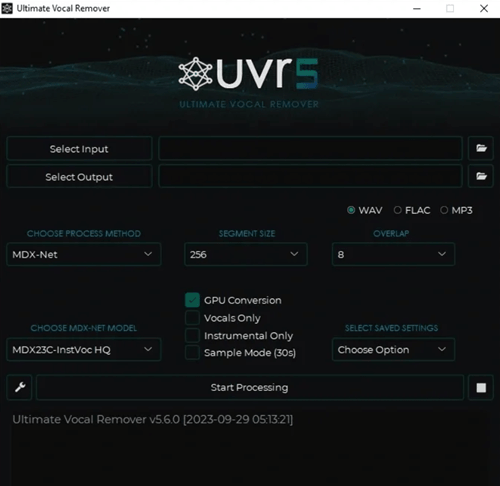
- UVR5 (Ultimate Vocal Remover): Still the #1 choice for professionals. In 2026, using the htdemucs_6s model provides the cleanest separation of static, percussion, and vocals.
- LALAL.AI: The best web-based alternative. Its 2026 "Orion" algorithm is specifically tuned to handle the unique frequency crossovers found in AI-generated music, isolating specific instruments like piano or guitar that Suno's native tool might miss.
Step-by-Step: From URL to Separate Vocals, Drums, and Bass
- Capture: Copy your song link and use SunoDown to download the raw high-fidelity file.
- Import: Drag the file into your chosen splitter (e.g., UVR5 or a professional DAW with built-in separation like FL Studio 2026).
- Process: Select the "Vocals/Drums/Bass/Other" model.
- Export: Save the stems as 24-bit WAV to maintain maximum quality for your mix.
Pro Tip: Cleaning up AI Artifacts in Your Stems
AI-generated stems often contain "digital chirps" (tiny high-frequency artifacts). Here is how the pros fix them in 2026:
- Spectral Editing: Use a tool like Steinberg SpectraLayers or Adobe Audition to visually identify and "paint out" the noise between vocal phrases.
- De-Essing & Gating: Apply a strict gate to the vocal stem to silence any background bleed during quiet moments.
- Saturation: Ironically, adding a bit of "Human" analog saturation (like a tube preamp plugin) can mask the robotic "thinness" of AI-extracted vocals, making them sit more naturally in a traditional mix.
Conclusion
While Suno's official tools are improving, the SunoDown + UVR5 combination remains the gold standard for high-fidelity stem extraction in 2026. By starting with a lossless source and utilizing professional cleaning techniques, you can transform an AI generation into a studio-quality production asset.
Ready to start your next remix? Download your high-bitrate Suno master on SunoDown.com now.