Suno AI v6 gives creators new ways to make music, but the quality of a saved MP3 also depends on the source audio and its encoding. If a download sounds thin or distorted, checking its bitrate is a useful first step before choosing another download method.
If you want a high-bitrate MP3 for listening or sharing, 320kbps is one option to consider. This guide covers Suno download methods and shows you how to check whether the saved file is actually encoded at 320kbps. A higher bitrate alone does not guarantee better source audio.
What 320kbps Means for Your MP3
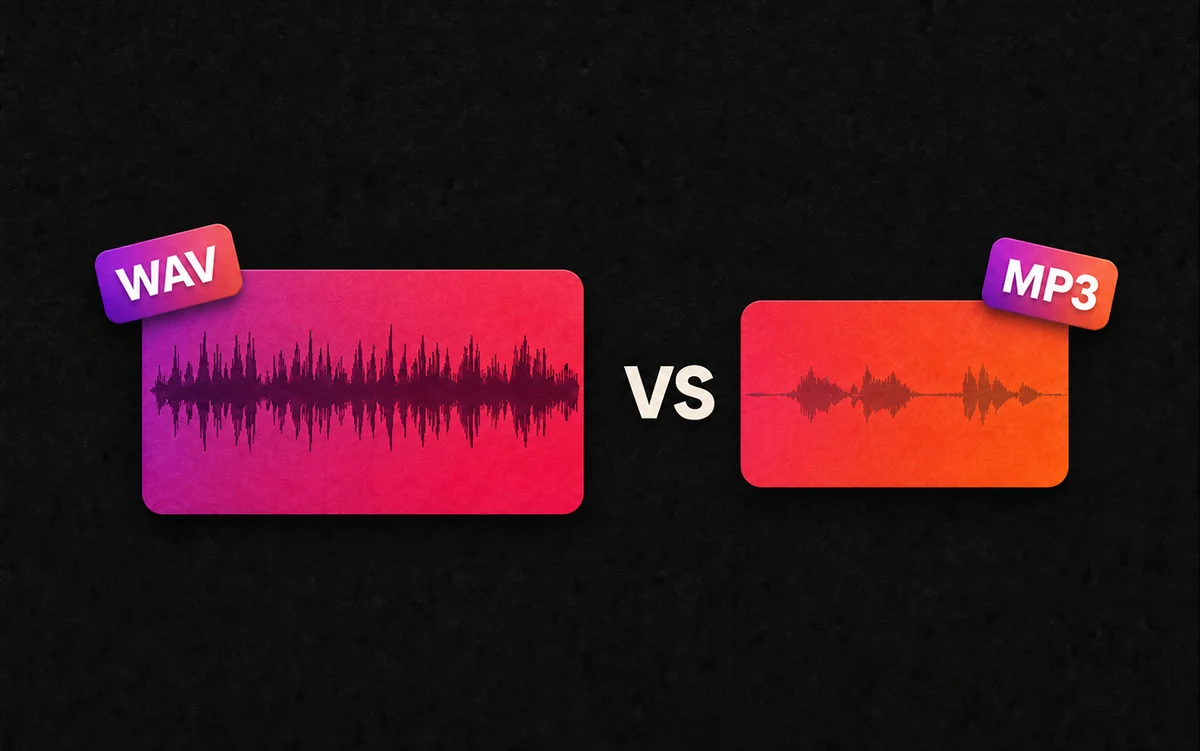
MP3 compression balances file size with audio detail. A 320kbps encoding can be useful when you want a high-bitrate MP3, though the source and encoder also affect the result.
- Compression Artifacts: Lossy encoding can introduce audible artifacts. Listen for changes in vocals and cymbals compared with the source; a bitrate number alone cannot tell you how noticeable they will be.
- Audio Detail: A higher bitrate gives the encoder more data to work with, but it does not restore detail already missing from the source or guarantee a particular frequency range.
- File Efficiency: A 320kbps MP3 uses approximately 2.4 MB per minute of audio, making it a practical option for storing music on your phone.
Note: Available bitrate depends on the source file; check your download to confirm 320kbps.
Method 1: Download MP3 Directly from Suno
You can save your songs directly from your Suno Library or Workspace:
- Find your song: Open your Library or Workspace and locate the track you want to save.
- Open the download menu: Click More Actions (…) next to the song, then choose Download.
- Save the MP3: Choose the MP3 option when available and save the file to your device.
- Check the result: Open the downloaded song to confirm it plays in full, then check its audio bitrate.
See Suno's official download instructions for menu details. Download availability and limits depend on your account.
Method 2: Using Online Suno Downloader
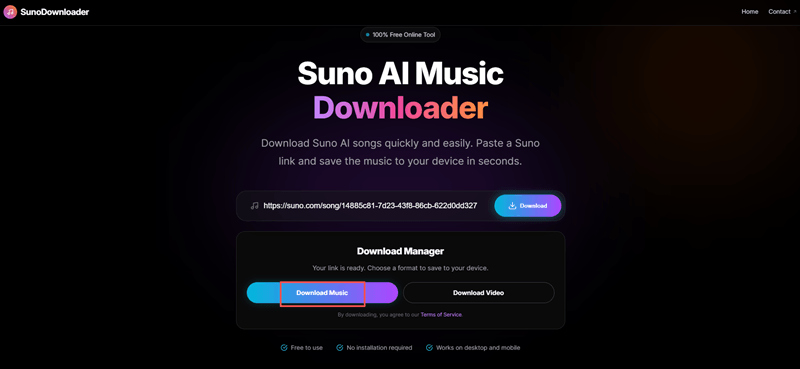
For most users, the online free Suno downloader available on SunoDown offers a straightforward way to save the available audio from a song link. Check the downloaded file with the bitrate-verification steps below.
Step-by-Step Tutorial:
- Copy your Suno Link: Open the Suno app or website and find your song. Then copy its URL from the top address bar.
- Paste into SunoDown: Visit Sunodown.com and paste the URL into the search bar.
- Download Music: From the dropdown menu, choose the "Download Music" option to export the MP3 file instantly.
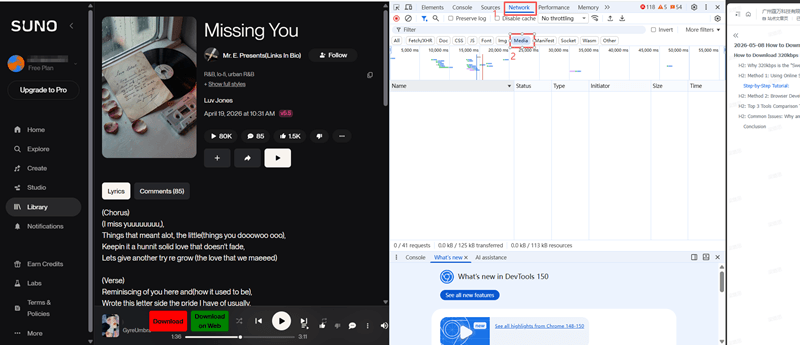
Method 3: Browser Developer Tools Hack (For Tech Users)
If you prefer not to use third-party tools, you can use the Chrome/Edge Developer Tools to locate the available audio stream, though this requires more manual effort.
- Open Suno.ai: Load the page for the song you want.
- Inspect (F12): Right-click anywhere and select "Inspect" or hit
F12. - Network Tab: Click on the "Network" tab and filter by "Media."
- Play the Song: Hit play on the Suno interface. You will see a data stream appear, usually an
.mp3or.m4afile. - Save: Right-click the relevant audio request, select "Open in new tab," and then press
Ctrl+Sto save.
Note: This method saves an available playback file; it does not guarantee 320kbps. Check the saved file's format, bitrate, and duration rather than relying on the request size.
How to check the actual MP3 bitrate
MediaInfo reports audio format, bitrate, sample rate and other file properties. Open your downloaded file in its desktop app and switch to a detailed view such as Tree or Text.
- Check the audio format: An MP3 may be identified as MPEG Audio, Layer 3. AAC audio in an M4A file is a different format, even if someone renamed the filename.
- Read the audio bitrate: Look in the Audio section, rather than relying only on the overall file bitrate. For a fixed 320kbps MP3, look for a reported audio bitrate of 320 kb/s and a Constant bitrate mode.
- Check duration and channels: Confirm you saved the full song rather than a preview. Listen to the start and end as well.
- Record the result: Keep the filename, download method, date, format, bitrate mode, audio bitrate and duration together when comparing versions.
Read the units carefully: 44.1 kHz or 48 kHz is a sampling rate; 320 kb/s is a bitrate. One does not establish the other. A Variable bitrate mode means the rate changes through the track, so a displayed average below 320 kb/s is not by itself a failed download.
A file-size check you can do yourself
For constant-bitrate audio, approximate audio size in decimal megabytes is kbps × seconds ÷ 8,000. For a three-minute track:
- 128kbps: approximately 2.88 MB.
- 192kbps: approximately 4.32 MB.
- 320kbps: approximately 7.20 MB.
Note: Sizes are estimates; tags and cover art add overhead. File size alone does not confirm audio quality.
Common Issues: Why Am I Still Getting Low-Quality Files?
If your download sounds "muddy" even at 320kbps, the issue may be in the generation phase, not the download phase.
- Prompt and Source Quality: Words such as "lo-fi," "retro," or "distorted" may influence the texture of a generated song. Compare the download with the original playback: if the same texture is present in both, changing the download bitrate will not remove it.
- A Newly Generated or Incomplete Track: If a song is still processing or the saved file cuts off early, wait until generation finishes, refresh the song page, and try downloading again. Compare the duration and playback of the new file; waiting alone does not guarantee a higher bitrate.
- Playback Enhancements: If your browser extensions, music player, or device applies audio effects or loudness normalization, temporarily turn them off for comparison. These settings can change what you hear without changing the saved MP3's bitrate.
Conclusion
When downloading a Suno song as a 320kbps MP3, check the saved file to confirm its bitrate, format, and full duration. Alongside the official and browser methods above, SunoDown offers a convenient way to save available audio from a song link.
Ready to start? Download your Suno track with SunoDown.