
For power users of Suno AI, efficiency is everything. While web-based tools like SunoDown.com are perfect for high-quality single exports, browser extensions offer the ultimate "one-click" experience by injecting download buttons directly into the Suno interface.
However, 2026 has seen a surge in "malware clones" on the Chrome Web Store. Not every plugin is safe, and some may compromise your Suno account tokens. In this guide, we review the best Suno downloader extensions based on three critical pillars: Safety, Permission Transparency, and v5.5 Compatibility.
2026 Extension Leaderboard: The "Safe List"
We have tested and verified the following extensions for the 2026 Suno v5.5 environment.
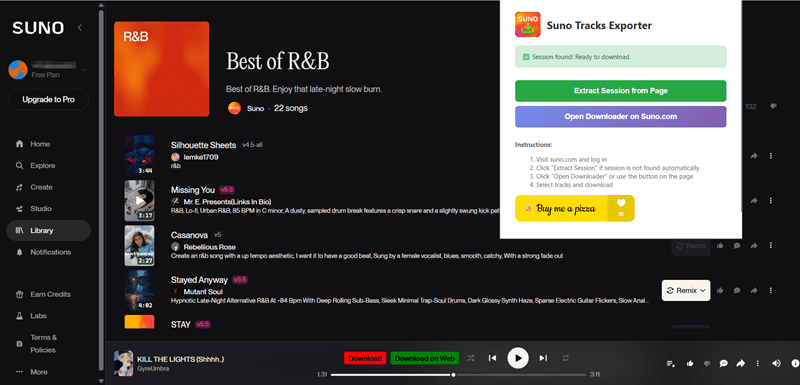
1. Suno Tracks Exporter (Chrome/Edge)
The current market leader for Chrome users. It stands out for its clean UI and "Batch Select" functionality within the extension popup.
- Best For: Bulk downloading your personal "Create" library.
- Key Feature: Automatically detects cover art and song titles.
- Security Rating: ⭐⭐⭐⭐⭐ (Minimal permissions required).
2. Suno Manager (Firefox/Multi-browser)
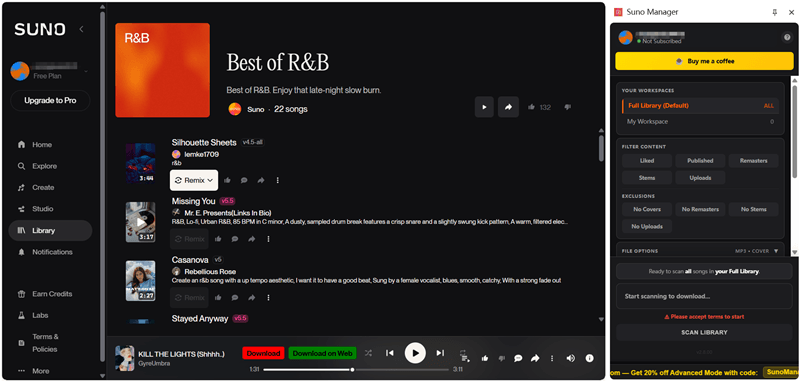
A "power tool" for Firefox users. It functions more like a library manager than a simple downloader.
- Best For: Organizing massive libraries into folders.
- Key Feature: Filter by "Liked Songs" or specific genres before downloading.
- Security Rating: ⭐⭐⭐⭐ (Requires library read access).
3. Suno Downloader by sunodownload.net (Cross-Platform)
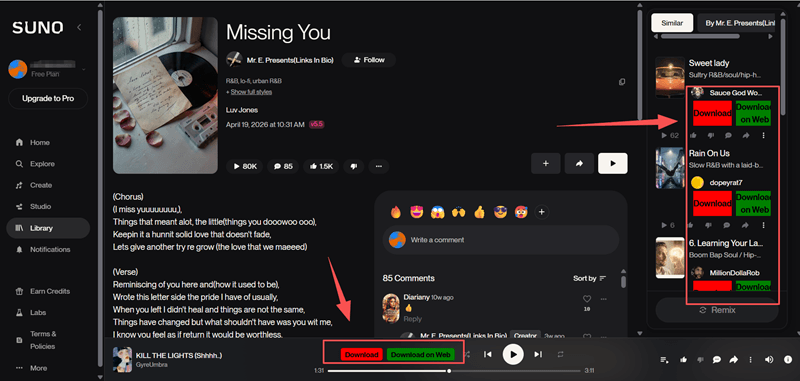
A lightweight, no-frills plugin that adds a simple "Download" button under every trending track in the "Explore" tab.
- Best For: Casual users who want a native-feeling experience.
- Key Feature: Works seamlessly on both Suno and Udio-style interfaces (but only available for downloading singles and not playlists).
- Security Rating: ⭐⭐⭐⭐ (Ad-supported in some versions).
Comparison Table: Speed & Permissions
| Extension Name | Supported Browsers | Standout Feature | Security Rating | Best Use Case |
|---|---|---|---|---|
| Suno Tracks Exporter | Chrome / Edge | Auto-detects cover art/titles | ⭐⭐⭐⭐⭐ | Bulk Downloading |
| Suno Manager | Firefox / Multi | Advanced library filtering | ⭐⭐⭐⭐ | Organizing large libraries |
| Suno Downloader by sunodownload.net | Cross-Platform | Seamless UI Injection | ⭐⭐⭐⭐ | Casual exploration |
⚠️ Security Alert: How to Avoid "Token Theft"
In 2026, browser extension security is more important than ever. Because Suno uses Bearer Tokens for authentication, a malicious extension could theoretically "steal" your account credits to generate songs for someone else.
Red Flags to Watch For:
- Over-Permissioning: If a simple downloader asks for "Read your browsing history" or "Access to all websites," un-install it immediately. A Suno downloader only needs access to suno.com.
- External Script Loading: Avoid extensions that load external JavaScript from unknown domains.
- Login Requests: A legitimate extension works by using your existing session. If an extension asks you to type your Suno password into its own popup, it is likely a phishing scam.
How Extensions Work: The "In-Page" Experience
Once you install a verified extension, your Suno.com experience changes. Instead of clicking "Share" and moving to another site, you will see a Download Button integrated into the player:
- The Sidebar Button: Some extensions add a sidebar where you can see all your recently generated tracks in a list.
- The UI Injection: Professional extensions like Suno Track Downloader place an icon next to the "Like" (heart) button on the main player.
- The Context Menu: Right-clicking any song title will often bring up a "Download MP3 (320kbps)" option.
The "Geek" Choice: Open-Source & GitHub Scripts
For users who don't trust browser store reviews, the safest path is Open Source.
Suno-Downloader (by jine)
Available on GitHub, this React/Express-based tool allows you to run your own local downloader.
- Pros: 100% transparent code; zero data tracking.
- Cons: Requires Docker or Node.js knowledge to set up.
Suno Vault
A popular CLI (Command Line Interface) tool for Windows/Mac.
- Pros: Can "raid" your entire account and download 500+ songs in 60 seconds.
- Cons: Requires you to manually find your
Authorization Bearertoken via F12 Inspect.
Pro Tip: Managing Your Browser's Memory
Extensions can be heavy. If you have 10+ AI tools installed, your browser may lag.
Recommendation: Use a "One-Click Extension Manager" to disable your Suno downloader when you aren't actively generating music. This keeps Suno.com running smoothly at the 60fps needed for v5.5's visualizer.
Conclusion: Efficiency Without Risk
Choosing the best Suno downloader extension is a balance between convenience and security. For most users, Suno Track Downloader provides the perfect middle ground—adding the features Suno is missing without overstepping on privacy.
Ready to upgrade your workflow? Explore the verified links above, or for a 100% cloud-based solution that requires no installation, always keep SunoDown.com bookmarked.