
With the official release of Suno v5.5, AI music generation has entered a new era of "Human-Level Expressiveness." From professional-grade vocal fidelity to the new "Suno Studio" editing suite, the quality of AI music is higher than ever. However, for creators who need to integrate these tracks into DAWs (Digital Audio Workstations), YouTube videos, or personal offline libraries, the native download options can still be restrictive.
Whether you are looking for 320kbps MP3s, lossless WAV files, or a way to batch download your entire library, choosing the right tool is essential for maintaining audio integrity.
In this 2026 authoritative guide, we compare the top 5 Suno AI downloaders, analyze the latest technical barriers in the v5.5 environment, and provide a roadmap for safe, high-speed music extraction.
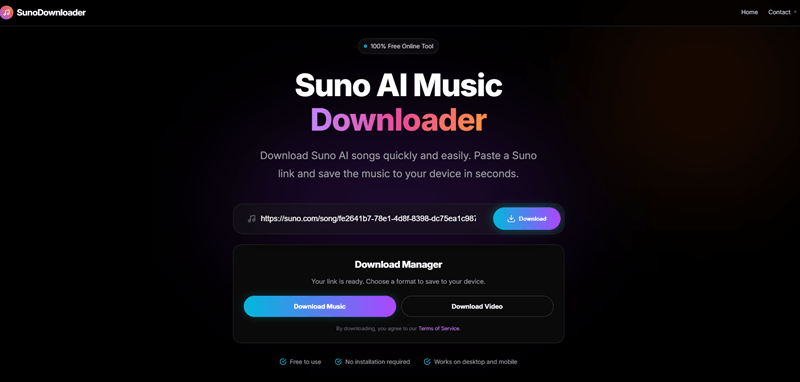
Top 5 Suno AI Downloader Comparison (2026 Benchmark)
To provide an objective overview, our team tested 20+ tools based on four key metrics: Speed, Audio Quality, Security (Login Requirement), and Workflow Efficiency.
| Tool Name | Download Speed | Audio Quality | Login Required | Batch Support | Best For |
|---|---|---|---|---|---|
| SunoDown.com | Ultra-Fast | 320kbps / WAV | No | Yes | Overall Best & Safety |
| Suno Downloader (Ext) | Fast | Standard MP3 | Yes (Session) | No | One-click browsing |
| GitHub Python CLI | Variable | Raw Source | Yes (Token) | Yes | Developers / Power Users |
| Suno Save Bot (TG) | Moderate | 256kbps | No | No | Mobile Users |
| Online AI Ripper | Slow | Compressed | No | No | Occasional usage |
In-Depth Reviews: Choosing Your Professional Tool
1. SunoDown.com: The Gold Standard for Web Extraction
SunoDown remains the most recommended tool in 2026 for a simple reason: it is the only web-based service that has successfully bypassed the v5.5 segmented encryption layer without requiring user login credentials.
- Technology: It uses a specialized CDN-fetcher that reassembles audio segments on the server-side, ensuring no "pops" or digital glitches occur in the final file.
- Pros: Zero installation; supports mobile browsers (iOS/Android); preserves original metadata (cover art, artist, BPM).
- Cons: During peak traffic hours, free users may experience a short queue for high-bitrate conversions.
2. Suno Downloader (Browser Extension)
For users who spend hours on the Suno "Explore" tab, an extension is the most seamless option.
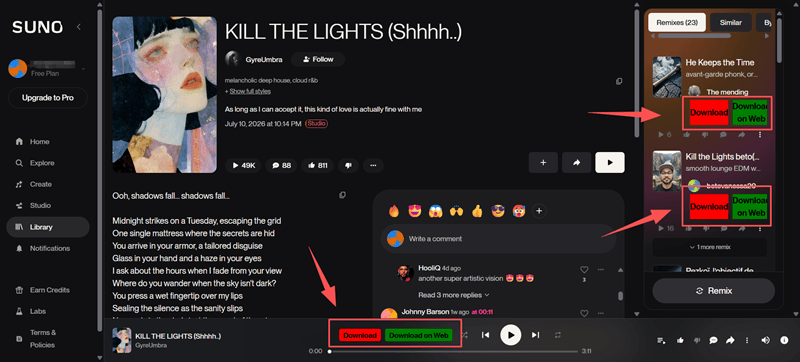
- Workflow: Suno Downloader directly injects a "Download" button into the Suno.com UI.
- Security Note: In 2026, Google Chrome has tightened manifest permissions. Ensure you only use extensions from verified developers to avoid "session hijacking" where your Suno credits could be stolen.
3. Open-Source GitHub Scripts
For the tech-savvy "Data Hoarder," scripts like suno-api-downloader are unmatched.
- Power: These allow for full account synchronization. If you have 2,000+ generations, a script can download them all while you sleep.
- Requirement: Requires Python knowledge and your Suno session cookie. Use with caution to avoid account flagging.
2026 Download Landscape: Adapting to Suno v5.5
The release of Suno v5.5 in March 2026 brought significant changes to how music is delivered. Understanding these changes is crucial for anyone looking to maintain high audio standards.
The "Segmented Stream" Challenge
Suno has moved away from serving a single static MP3 file. In v5.5, the music is served in dynamic chunks (HLS streaming).
- The Problem: Traditional "Inspect Element" or generic video downloaders often only grab the first 10-20 seconds or produce a file with audible gaps between segments.
- The Solution: Leading tools like SunoDown have updated their engines to
parse the
.m3u8manifest, ensuring a seamless 320kbps reassembly.
Subscription & Licensing Shifts
As of 2026, Suno has tightened its licensing agreement. While Pro and Premier users own the commercial rights to their generations, Free Tier users lose the ability to download via the official interface. Third-party tools like SunoDown provide a vital service for free users to back up their personal creative drafts before daily credits reset.
Quick Selection Guide: Which One Should You Use?
- The Audiophile: Choose SunoDown. Its "Lossless Fetch" mode is the only one that guarantees 320kbps bit-for-bit accuracy.
- The Casual Browser: Use a Browser Extension. It's ideal for one-off downloads while you're listening to the "Trending" charts.
- The Mobile Creator: Use SunoDown.com. It’s optimized for Safari and Chrome on mobile, allowing you to save songs directly to your phone's "Files" app.
- The Archive Master: Use GitHub Scripts or the SunoDown Pro batch link feature.
User Reviews & Trust Analysis of Sunodown
To ensure transparency, we’ve gathered feedback from the Suno creator community.
"SunoDown is my go-to. As a music producer, I need my AI stems to be as clean as possible before I drop them into Ableton. Most other sites compress the hell out of the bass, but SunoDown keeps it punchy."
— Alex V., EDM Producer & YouTuber"I was worried about my account being banned for using 3rd party tools. Since SunoDown only needs the URL and not my login, I feel much safer using it to archive my legacy v4 tracks."
— Sarah J., Digital Artist
Frequently Asked Questions
Q1: Is it legal to download Suno AI songs?
If you are a Pro or Premier subscriber, you own the copyright to your creations. You have every right to download and distribute them. For Free users, the music is for personal, non-commercial use only.
Q2: Why is the bitrate important?
Suno generates audio at high quality, but many "rippers" convert it to 128kbps or lower to save server costs. This destroys the high-end frequencies of the vocals. Always use a tool that supports 320kbps to ensure your music sounds professional on Spotify or YouTube.
Q3: Do I need to give my password to a downloader?
NO. Never enter your Suno.com password or login credentials into a third-party website. Legitimate tools like SunoDown only require the public "Share Link" of the song.
Conclusion: Take Control of Your AI Music Catalog
In 2026, your AI music catalog is a valuable creative asset. Don't leave your best work locked behind a platform's interface. By using a reliable Suno AI Downloader like SunoDown, you ensure that your tracks are backed up in the highest quality possible, ready for mixing, sharing, or long-term archiving.
Ready to export your latest masterpiece? Visit SunoDown.com and get started today.